 Written by
Brand compliance checks make sure a design follows the brand guidelines before a customer, a printer or an ad platform ever sees it. For years, that meant a brand manager with a PDF of the brand book and a sharp eye. That still works for ten assets a month. It does not work for five hundred, which is what a campaign looks like once AI agents produce the variants. This guide explains which brand rules a machine can check, how to write guidelines an agent can follow, which tools do automated brand checks today, and how to run them on a schedule with Doop.
What brand compliance checks cover
A complete brand check looks at more than colour. A typical list for a marketing team covers:
- Colour: only palette colours, in the right proportions, on approved backgrounds.
- Typography: only brand fonts and weights, on the type scale, never stretched.
- Logo: the current file, a minimum size, clear space, and no recolouring.
- Layout: spacing on the grid, safe zones for social formats, and consistent corner radii.
- Imagery: photo style, people and settings that fit the brand, and no off-brand stock clichés.
- Copy: tone of voice, spelling of product names, and banned words.
- Legal: disclaimers, trademark symbols and claims that need a footnote.
- Accessibility: text contrast, minimum text sizes and alt text.
- Print specs: colour space, bleed, embedded fonts and image resolution.
Two kinds of brand rules: testable and judgment
The most useful step is to split the brand book into two lists. Some rules have one right answer, so a linter can test them exactly. Others need taste, so they need a reviewer, whether that is a person or an AI agent.
| Testable rules | Judgment rules |
|---|---|
| Colour is one of the palette’s tokens | The image feels warm and optimistic |
| Font family is Hanken Grotesk or Inter | The headline sounds like us |
| Text contrast is at least 4.5:1 | The layout has a clear focal point |
| Logo is at least 24 px tall | The photo fits the campaign idea |
| No text outside the frame or clipped | The offer is not overstated |
Testable rules belong in tools that run on every change, because they are cheap and never get tired. Judgment rules belong in a review step, and an AI agent is now a reasonable first reviewer. It flags likely problems and leaves the final call to a person.
Write brand guidelines an agent can check
Most brand books are written for humans and full of adjectives. “Our green is fresh and confident” is fine for inspiration. However, it is useless to a checker. Rewrite the rules with exact values, named tokens and clear exceptions. Here is a short example of a style guide an agent can follow:
## Colour
- Primary: brand-600 (#1F7A4D). Use for one call to action per layout.
- Text: ink-900 on paper-50. Never pure black on pure white.
- Never place brand-600 text on brand-100 backgrounds (fails contrast).

## Type
- Headlines: Hanken Grotesk 300, sentence case, max 8 words.
- Body: Inter 400, 16 px minimum on screen, 9 pt minimum in print.

## Logo
- Use logo-primary.svg. Minimum height 24 px. Clear space = height of the "d".
- Never recolour, rotate or place on photos without the dark scrim.

## Copy
- Product name is "Morgen Box", never "Morgen box" or "MorgenBox".
- No "best", "#1" or "guaranteed" without a footnote from legal.
Notice the pattern. Each rule names a value, a token or a file. Each “never” gives the reason when it is not obvious. As a result, the same guide works for a human designer, a linter and an agent.
Tools for automated brand compliance checks
Several tools check parts of the list today. Most of them focus on one medium or one kind of rule.
- Figma Check designs finds styles and variables that should come from your libraries and suggests replacements. Figma says it does not use generative AI. As of late 2026, it is a private beta on Organization and Enterprise plans.
- Design Lint is an open-source Figma plugin that flags missing styles for colours, fonts and effects.
- Stark checks accessibility, including contrast and colour-blindness simulation, inside design tools and code.
- Adobe GenStudio for Performance Marketing validates generated marketing content against brand guidelines inside Adobe’s stack.
- Frontify and Canva brand controls prevent problems rather than detect them. They keep approved logos, colours and locked templates in one place.
- Enfocus PitStop and Acrobat Preflight are the print world’s linters. They check PDFs for colour space, fonts, resolution and bleed, and they can fix many issues automatically. Our design handoff process guide includes a printer checklist.
The common gap is the judgment half. A linter tells you the hex value is off-palette. It does not tell you that the photo is wrong for the audience, or that the headline makes a claim legal will reject. That is where agents come in.
How Doop runs brand compliance checks
Doop combines both halves on one canvas, where people and AI agents design together. Every frame is real HTML, so checks read actual values instead of guessing from a screenshot.
Rules live on the canvas
Each canvas holds design tokens (colours, fonts, spacing, radii, with light and dark themes), components with variants, and written style guides like the example above. When a token changes, every frame that uses it restyles. In addition, external agents such as Claude Code are reminded to read the style guides before they design. The built-in Doop agent gets them as rules that outrank its own taste.
Testable rules, checked automatically
Doop checks the mechanical rules on every write. When an agent writes a raw hex value that matches a token, Doop tells it to use the token instead. The inspect_frame tool reports content past the frame’s edge, clipped text and overlapping elements, plus every colour and font in use. The same check runs in CI, so a build fails when a frame breaks:
doop inspect "Spring hero" --fail-on-problemsTo add an agent review to the same pipeline, see Setup 2 in design automation with Claude Code and Codex.
Judgment rules, reviewed by specialist agents
For the judgment half, every canvas has resident reviewer roles. Brand Compliance looks for off-palette colours, stray fonts, inconsistent radii and shadows, logo misuse and tone, judged against the canvas’s own frames and style guides. Accessibility reviews against WCAG AA, including the 4.5:1 and 3:1 contrast ratios, headings, alt text, focus states and 44 px touch targets. Visual Polish handles alignment, spacing and the type ramp.
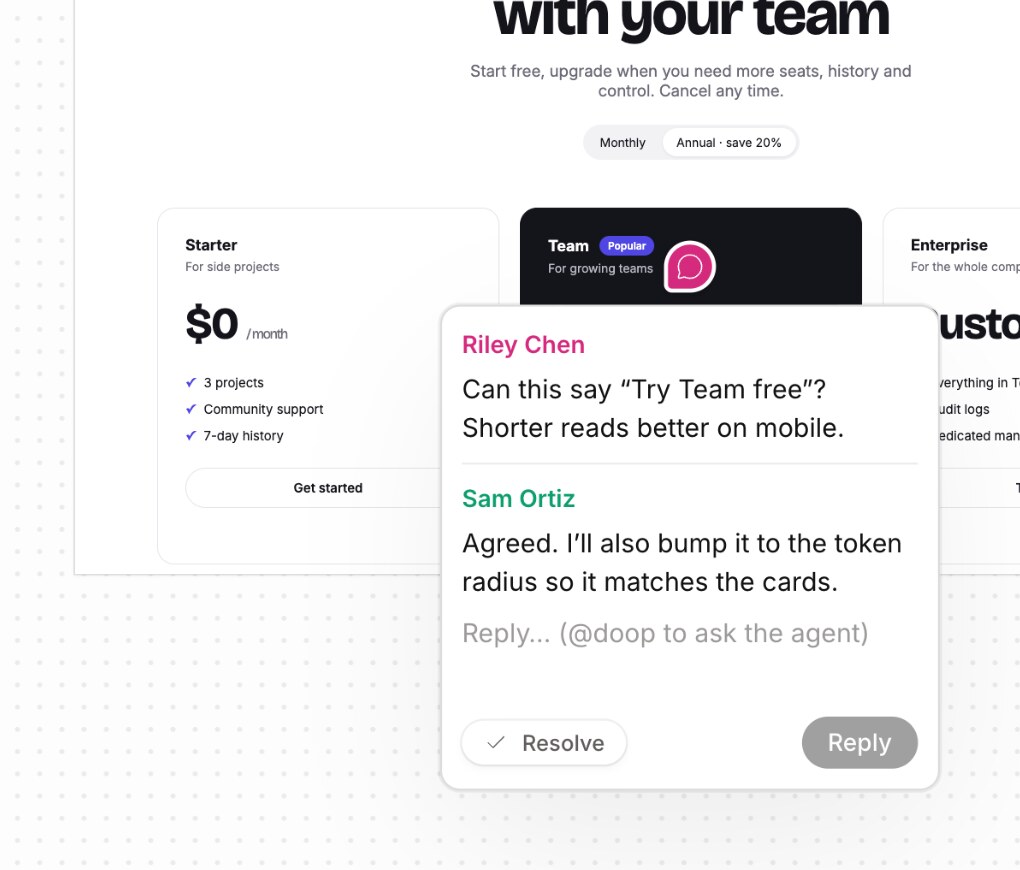
Mention a role in a comment and it picks the thread up as a task. For example, comment @brand on a social post, and the Brand Compliance role reviews that element, fixes what it can, and replies in the thread.
Your own checkers
Brand books always have rules no off-the-shelf tool knows. Doop lets a workspace add up to 20 custom agents, each with its own handle and instructions. A bank might add @legal to check that every rate claim has its footnote. Likewise, a retailer might add @pricing to check that sale prices show the original price. These specialists read the same canvas and the same style guides as everyone else. For checks across a whole campaign, from print to social, see marketing design automation.
A weekly brand check pipeline
Checks only help if they run without anyone remembering to start them. Doop’s automations include a ready-made Brand and accessibility check example. Start from it and extend it like this:
- Trigger: every Wednesday at 10:00 in your time zone.
- Agent step: the Brand Compliance role reviews the campaign canvas against its style guides, fixes what breaks them, and reports what it changed.
- Agent step: the Accessibility role runs its own pass on the same canvas.
- Linear step: one ticket links to the canvas, so a person reviews the changes in one place.
Because every fix lands in the frame’s version history, nothing is lost. If the agent was wrong, restore the earlier version in one click. Also, if a frame was already approved, the fix flips it to Needs review, so the approver sees the change before it ships. Our AI design review tools comparison shows how this compares with CI-based review.
What not to automate in brand checks
Automated brand compliance checks are a filter, not a verdict. Keep three decisions with people. First, exceptions: a partner co-brand may break the palette on purpose. Second, the creative idea: an agent can say a photo is off-style, but only a person can say the campaign needs that tension. Third, final sign-off, which should always be a named human. For how that sign-off works, see our design approval workflow, and for the bigger picture, the design automation guide.
Frequently asked questions
What is a brand compliance check?
It is a review that confirms a design follows the brand guidelines: colours, fonts, logo use, layout, imagery, copy, legal lines and accessibility. It can be manual, automated with a linter, or done by an AI agent.
Can AI check designs against brand guidelines?
Yes. Agents are good at flagging off-palette colours, wrong fonts, logo misuse and tone problems, especially when the guidelines use exact values. A person should still make the final call on judgment rules.
How do you check brand compliance for print files?
Run the final PDF through a preflight tool such as Acrobat Preflight or Enfocus PitStop. It checks colour space, fonts, image resolution and bleed against a profile from your printer.
How often should brand compliance checks run?
Testable rules should run on every change. Agent reviews work well on a schedule, such as weekly, and before every approval.