 Written by
AI design review tools are not about taste. The question a real design review answers is narrower and harder: is this change consistent with the design system you already have? Are the right components used instead of re-invented, are values on tokens instead of hardcoded, do states and spacing follow the rules the team agreed on? An agent can answer that, but only if it can reach three things a chat window cannot give it: a render of the actual design, the markup or tokens behind it, and a channel to file or fix what it finds. This roundup compares six tools that provide that loop, over MCP or in CI. To keep it honest, we ran a live review through the first one and published the artifacts.
What an AI design review actually needs
A useful review loop has four steps. First, see: the agent pulls a current render at real breakpoints, not a stale export. Second, read: it inspects the markup, styles and tokens behind the pixels, because “this button is off-system” is a guess from a screenshot and a fact from the code. Third, judge against the system: does the change use existing components or hand-rolled lookalikes, are colors and spacing declared through tokens, do hover and disabled states exist, and only then the universals like contrast, hierarchy and clipped content. Finally, act: it files findings where the team works, and applies the mechanical fixes itself. The six tools below differ mainly in how much of that loop they expose.
1. Doop: review roles, comments and fixes on one canvas
Doop treats review as a first-class job, not a prompt. Every canvas has resident reviewer roles you can route work through in order: a UX lead, a copywriter, brand compliance, accessibility and visual polish, each picking up cards or @mentions addressed to them. External agents like Claude Code join over the design MCP with the full loop: frame screenshots, raw HTML access, element-pinned comments, and direct find-and-replace fixes.
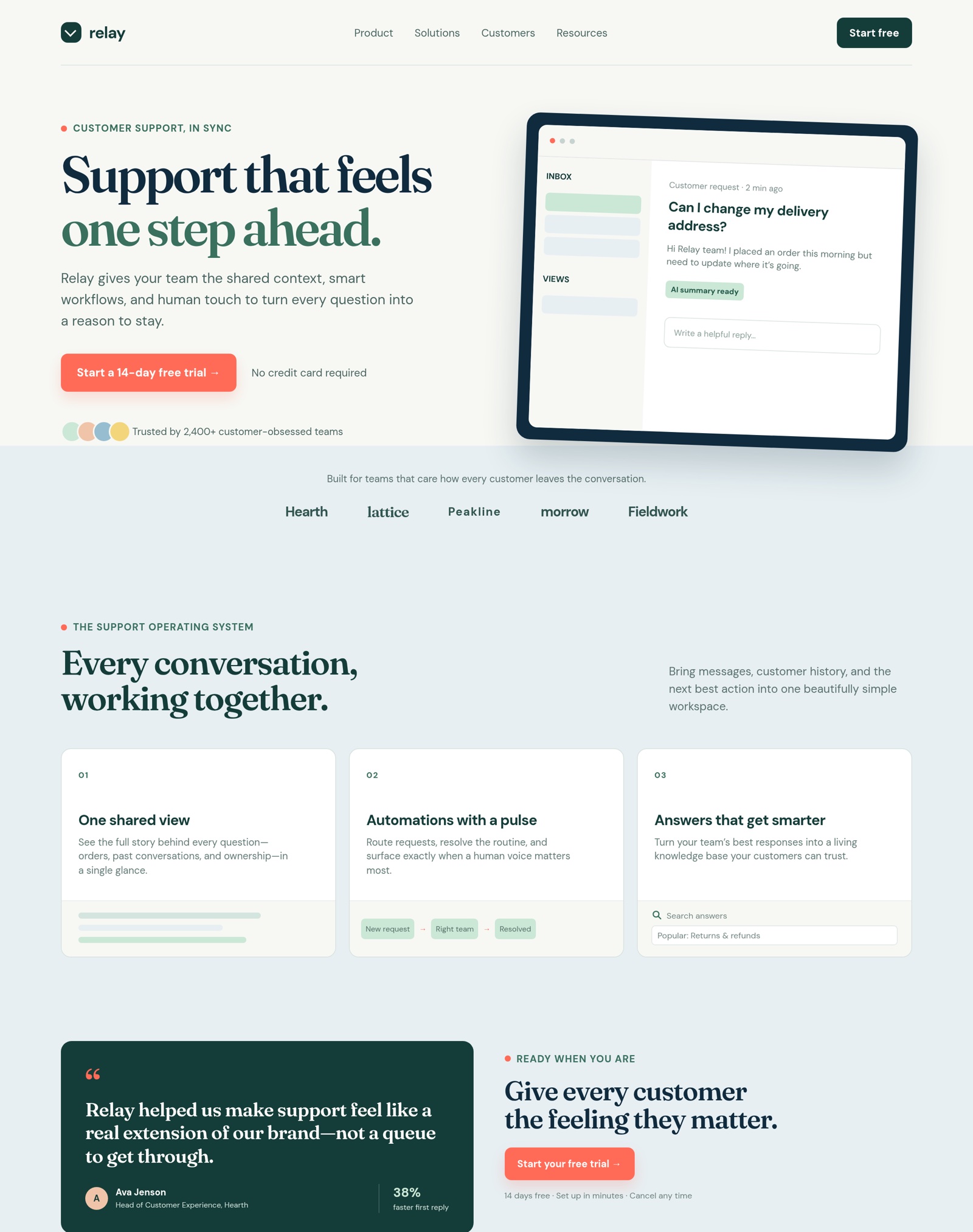
Here is the live demo. We pointed Claude Code at an old agent-made landing page (the “Relay” page, of four-Relays fame) and asked for a review. It pulled the screenshot and the markup, found five issues, fixed the two mechanical ones directly in the frame’s HTML, and filed the three judgment calls as open findings:
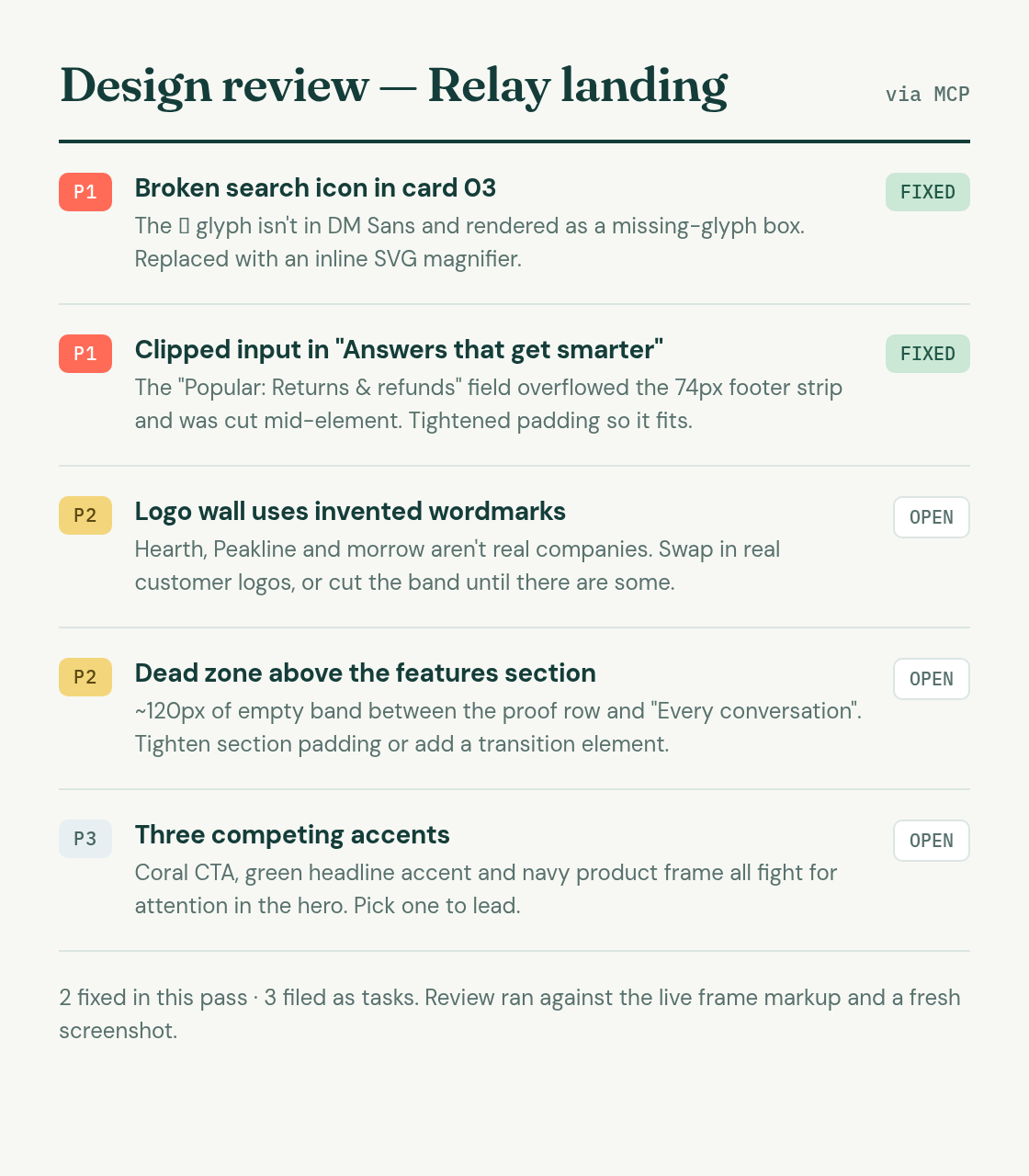
The two fixes were exactly the kind a human reviewer hates typing up: a search icon rendered as a missing-glyph box because the ⌔ character was not in the page font, and an input clipped mid-element by a fixed-height card footer. Both were repaired with surgical find-and-replace edits, no regeneration:
It is for: teams that want review and repair in the same multiplayer place, with any MCP agent, on an open-source (AGPL-3.0) stack.
2. Impeccable: the design review gate in your CI
Impeccable is the purest expression of the consistency framing: a GitHub app that reviews every pull request the way a staff designer would, and gates the merge on it. Its pitch nails the gap: “Code review caught up with agentic development. Design review did not.” It renders changed routes at desktop and mobile breakpoints, then checks design-system compliance (token usage, spacing consistency, color declarations), component states, accessibility and UX friction. The example findings read like a good reviewer, not a linter: “Send invite is the only blue thing in an app that acts in apricot.” There is no MCP here, and that is the point: the review lives where the gate is, in CI. It is in closed beta as of October 2026.
It is for: teams whose agents ship UI in pull requests and want system compliance enforced before merge, automatically.
3. Figma MCP: review against the design system of record
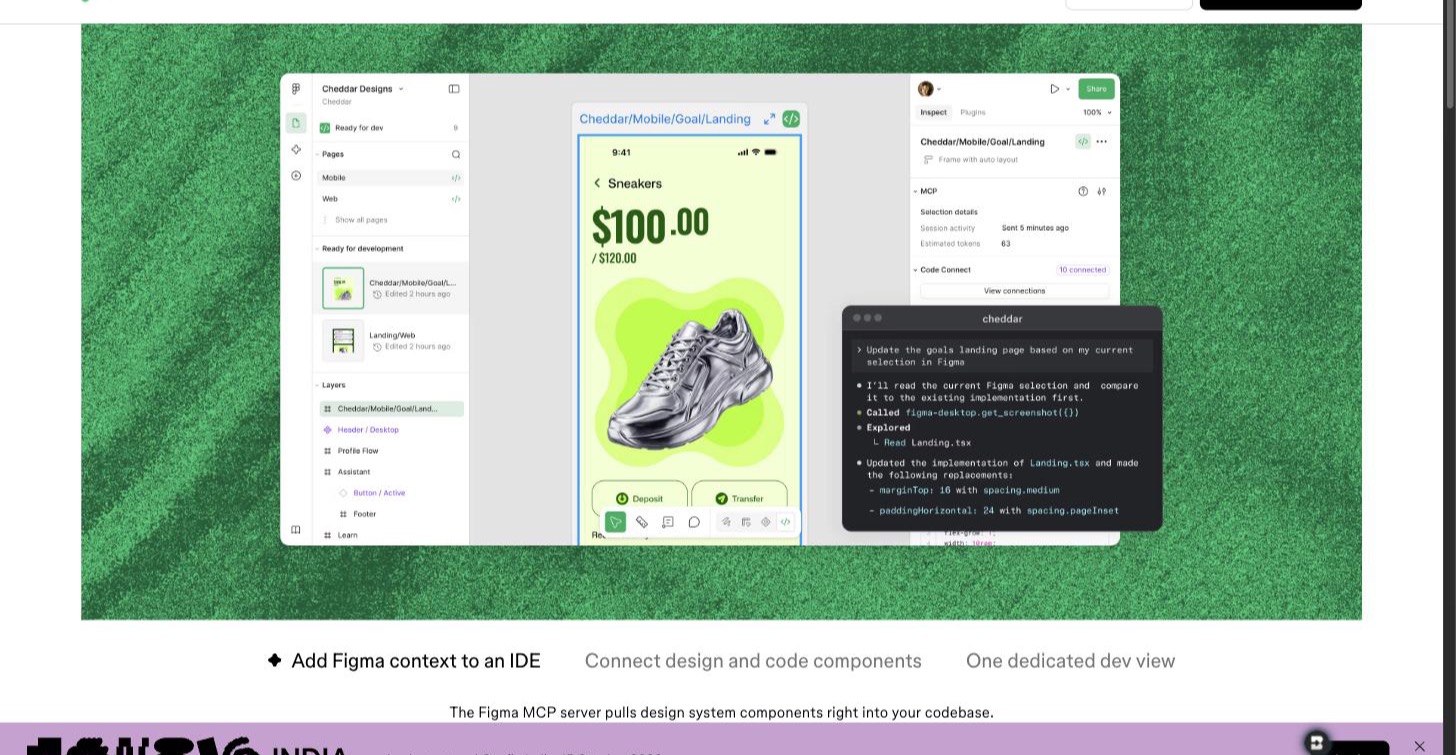
The Figma MCP server is the strongest option when the question is not “is this pretty?” but “does this match our system?”. An agent pulls get_screenshot and get_design_context for any node, which means it reviews against real variables, components and Code Connect mappings rather than vibes. The common workflow runs in reverse, too: review the implementation against the Figma source and flag every hardcoded value that should be a token. Writes to the canvas exist in beta, so most fixes still land in code rather than in the file.
It is for: design-system teams policing drift between Figma and production.
4. Paper: comment threads your agent can work
Paper’s MCP exposes the review loop designers already use: comment threads. An agent can list threads, read a thread’s context, screenshot the artboard, fix the issue with node-level writes, and set the thread’s status when done. That makes Paper the closest thing to “assign the ticket to the robot” inside a traditional canvas tool: a designer leaves comments, the agent resolves them one by one, and the thread history is the audit trail.
It is for: designer-led teams who want feedback left on the canvas to get actioned without a standup.
5. Pen: design review as code review
Pen answers the review question with git. Designs are .pen files committed next to code, so a design change arrives as a pull request diff, and review happens where engineers already review: in the PR. Agents connect over MCP or the CLI, every edit is schema-validated, and the CLI runs headless in CI, which means you can gate a merge on a design check the same way you gate it on tests.
It is for: engineering-led teams that want design reviewed exactly like code, including in CI.
6. Google Stitch: critique yes, direct fixes no
Stitch makes the list with an asterisk. Its MCP server gives an agent get_screen, which returns both the screenshot and the full HTML of any generated screen, so Claude Code can critique a Stitch design in depth. The limit is the fix path: there is no tool to patch the markup, so every correction goes back through a natural-language edit_screens prompt and Gemini reinterprets it. For mechanical fixes like the clipped input above, that is a coin flip rather than a repair.
It is for: reviewing and iterating Stitch’s own output before you export it, not for reviewing designs that live anywhere else.
The loop, compared
| Tool | Design-system checks | Sees render / reads structure | Feedback channel | Agent applies fixes |
|---|---|---|---|---|
| Doop | Canvas style guides + taste memory | Frame screenshots / raw HTML | Element comments, cards, roles | Yes, find-and-replace edits |
| Impeccable | Tokens, spacing, colors, states (core) | Rendered routes / PR code | PR review, merge gate | No, reviews only |
| Figma MCP | Variables, components, Code Connect (core) | Node screenshots / design context | Your code review flow | In code; canvas writes in beta |
| Paper | Tokens and themes | Artboard screenshots / computed styles | Native comment threads | Yes, node-level writes |
| Pen | Design libraries, schema validation | Exports / .pen file contents | Pull requests, CI | Yes, schema-validated edits |
| Google Stitch | DESIGN.md | Screen screenshots / HTML (read-only) | None built in | Prompt-mediated only |
One honorable mention without MCP: Framer’s agent runs site reviews that catch contrast issues, typos, missing alt text and SEO gaps on Framer-hosted sites. It connects to external agents through a native link rather than a design review MCP server, so it reviews Framer sites and nothing else.
What to put in the review prompt
Whichever tool you pick, the review is only as good as its checklist, and the checklist should start with the system, not the pixels. Ours asks the agent to check, in order: does this screen use existing components or re-implement them; are colors, spacing and radii declared through tokens rather than hardcoded; do interactive elements have their full set of states; does the type ramp match the scale. Then come the universals: clipped or overflowing content, missing glyphs and images, contrast, hierarchy, alignment, spacing rhythm, and placeholder or invented content. In addition, tell the agent what it may fix on its own (mechanical bugs, off-token values) versus what it must file (brand and product calls). That split is what made the Relay demo useful: two fixes shipped, three decisions stayed human.
Frequently asked questions
Can AI check design-system consistency?
Yes, and it is the strongest use of the whole category. Impeccable checks token usage, spacing and component states on every pull request; the Figma MCP exposes your variables and components so an agent can diff an implementation against them; Doop pins style guides to the canvas that every reviewing agent must follow. Consistency checks are mechanical enough for agents to be reliable at them.
What is a design review MCP server?
An MCP server that lets an AI agent review a design the way a senior designer would: fetch the current render, read the underlying structure, leave feedback in the team’s channel, and apply approved fixes. Doop, Figma, Paper and Pen all expose that loop; generation-only MCPs do not.
Can Claude Code review Figma designs?
Yes. Through the Figma MCP server it screenshots any node and reads its design context, which is enough for a thorough critique and for checking implementations against tokens. Writing fixes back into the Figma canvas is in beta; writing them into your codebase works today.
Should the reviewing agent also apply the fixes?
For mechanical defects, yes: broken glyphs, clipped elements and off-token values are safer to fix than to describe. For judgment calls, no: file them. Every tool in this list except Stitch supports that two-track approach.
Run a review on your own design
The fastest way to feel the difference is to hand an agent something you shipped last quarter. Open a Doop canvas, import the page, and ask Claude Code for a review with the checklist above; the source is on GitHub if you would rather run the whole loop on your own infrastructure.