 Written by
Most paid social still runs by hand. Every Monday someone opens Ads Manager, exports last week’s numbers, spots the ads that are fading, briefs a designer, waits a few days for new creatives, uploads them, and starts again. That loop is most of a performance marketer’s week, and almost all of it is repetitive. This post shows how to automate Meta ads with three pieces: a scheduled Claude agent, the Meta CLI for reading and writing to the Marketing API, and a Doop canvas where the agent designs the creatives.
We built it for a real account. SlideSpeak sells AI-narrated training videos to learning and development teams, and every number below comes from their L&D campaign between August 12 and September 3, 2026. The result is an agent that wakes up on a schedule, looks at what is working, designs new variants of the winners on the canvas, and stages them paused. A human still approves what goes live.
How the manual loop works today
Before you automate Meta ads, it helps to name the loop you are replacing. Talk to any paid social team and you will hear the same weekly rhythm:
- Pull performance. Export spend, impressions, CTR, frequency and cost per result for every ad, usually for the last 7 or 14 days.
- Find fatigue and winners. Ads that keep spending but lose CTR while frequency climbs are fatiguing. Ads with a low cost per result are winners worth refreshing.
- Write a creative brief. “Take the onboarding angle, try it on the light background, and test a shorter headline.”
- Design the variants. A designer produces three to five new images per angle, in square and vertical formats.
- Upload and launch. Someone builds the creatives and ads in Ads Manager, pauses the losers, and waits.
Steps one, two and five are pure data work. Step four is repetitive once a design system exists. Only step three needs real judgment, and even there, the judgment follows patterns an agent can learn from written rules. That is why this loop is such a strong candidate for automation.
The three tools
The Meta CLI
The Meta CLI is a small command line tool that wraps the Meta Marketing API. Instead of writing Graph API requests by hand, you run short commands. For example:
meta ads insights get --date-preset last_7d --fields spend,impressions,ctr,cpc,frequency,actions
meta ads creative create --name "Onboarding vertical v2" --image ./onboarding-v2.png \
  --page-id PAGE_ID --link-url https://slidespeak.co --call-to-action LEARN_MORE
meta ads ad create ADSET_ID --name "Onboarding v2" --creative-id CREATIVE_ID --status PAUSED
Every command supports --output json, so an agent can parse results without scraping tables. That single property is what makes the CLI agent friendly. A language model is very good at reading JSON and deciding what to do next, and very bad at clicking through Ads Manager.
A Doop canvas for the creatives
The creative step is where most ad automation projects stall. Generating a random image is easy. Producing an on-brand ad in the right sizes, with the right fonts, a real product screenshot and a logo in the Reels safe zone, is not.
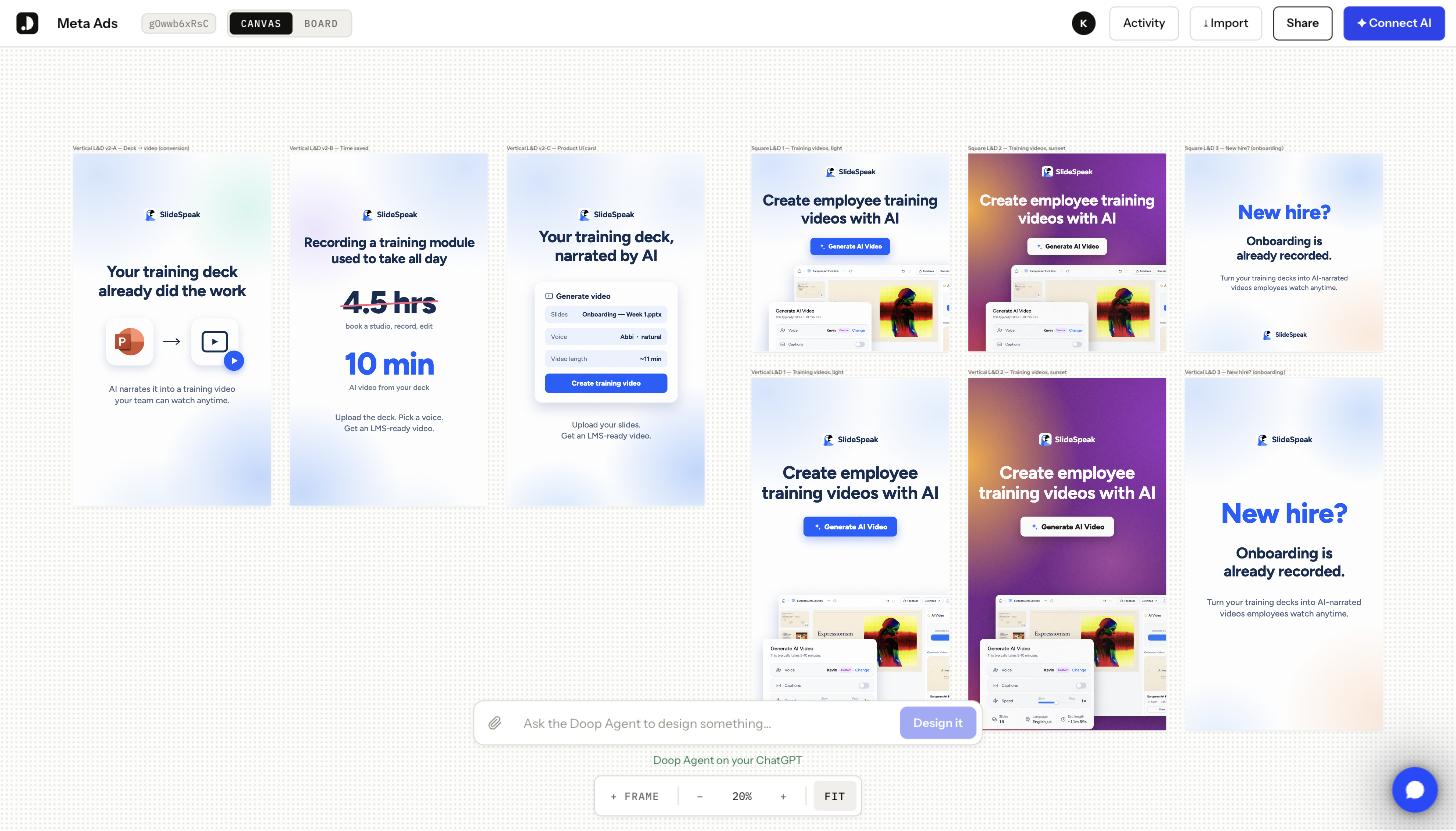
Doop solves this by giving the agent a shared design canvas. Doop ships as an MCP server, so you connect it to Claude Code or Codex once and the agent gets the canvas as a set of tools: create a frame, write HTML into it, screenshot it, edit it, and export it. Each ad is a frame that renders real HTML. The agent writes markup, takes a screenshot of its own frame, fixes spacing or contrast, and then calls the export tool, which returns a PNG or JPG URL at any scale. That URL is what goes straight into the Meta CLI as the creative image. Humans see the same canvas live, so design review happens by commenting on a frame rather than by email.
For SlideSpeak we moved the existing L&D ad drafts onto one canvas: square feed posts and vertical Reels formats, all built from one shared stylesheet. Because the frames share CSS, a new variant means changing a headline and a background rather than designing from scratch.
A scheduled Claude agent
The third piece is the orchestrator. Claude Code can run on a schedule, and it can call both the Meta CLI and Doop as tools. We give it one instruction file that describes the loop, the thresholds and the guardrails. Step 6 below shows how to put it on a weekly schedule.
The automation loop, step by step
Here is what the agent does on each run to automate Meta ads. Alongside each command, we note the decision it makes.
Step 1: Pull the numbers
The agent queries insights for each live ad, week by week, so it compares trends rather than snapshots.
meta --output json ads insights get --ad-id 120251667412300734 \
  --since 2026-08-12 --until 2026-09-03 --time-increment weekly \
  --fields spend,impressions,ctr,cpc,frequency,actions,cost_per_action_type
Here is what that returned for the main L&D feed ad:
| Week starting | Spend | CTR | CPC | Frequency | Purchases |
|---|---|---|---|---|---|
| Aug 12 | $151 | 1.40% | $2.48 | 2.35 | 1 |
| Aug 19 | $124 | 1.15% | $1.91 | 2.69 | 7 |
| Aug 26 | $224 | 1.21% | $2.20 | 2.74 | 1 |
Read it the way a marketer would. CTR is stuck near 1.2% and frequency climbs every week, so the same people keep seeing the same image. Purchases spiked in week two and then fell back to one. That is the shape of a creative that worked and is now wearing out.
Step 2: Classify every ad
The agent sorts ads into three buckets using rules written in a plain text file:
- Winner: cost per purchase in the top third, frequency under 3, CTR flat or rising week over week.
- Fatigued: spend above the campaign median, CTR down more than 20% versus the previous week, or frequency above 3.
- Not enough data: under $100 spend or 1,000 impressions in the window. The agent leaves these alone.
Applied to the campaign, the rules produced this table:
| Ad | Spend | CTR | Frequency | Cost per purchase | Bucket |
|---|---|---|---|---|---|
| L&D feed (square) | $570 | 1.23% | 3.40 | $63 | Fatigued, still the winner |
| L&D vertical (Reels) | $87 | 1.63% | 3.85 | none yet | Not enough data |
Two things jump out. First, the feed ad is the only one producing purchases, at $63 each, so the angle deserves a refresh rather than a replacement. Second, the vertical ad has barely spent anything, so the Reels placement is untested for this audience.
However, the placement breakdown tells a sharper story. Instagram Reels ran at 2.68% CTR and $0.85 CPC, the best of any placement in the campaign, on only $25 of spend. Facebook feed took $514 of the $670 total at 1.28% CTR and $2.14 CPC. A human had three weeks to notice that. The agent found it in one run.
Because the rules live in a text file, a marketer can change them without touching code. That matters. The value of the agent is consistency, and consistency comes from rules people agree on in advance.
Step 3: Write a brief on the canvas
For each winner, the agent writes a short creative brief: what angle worked, which format it ran in, and two or three hypotheses for a variant. It posts the brief to the Doop canvas as a note before it designs anything, so a reviewer can read the reasoning next to the frames. From the run above, the brief read:
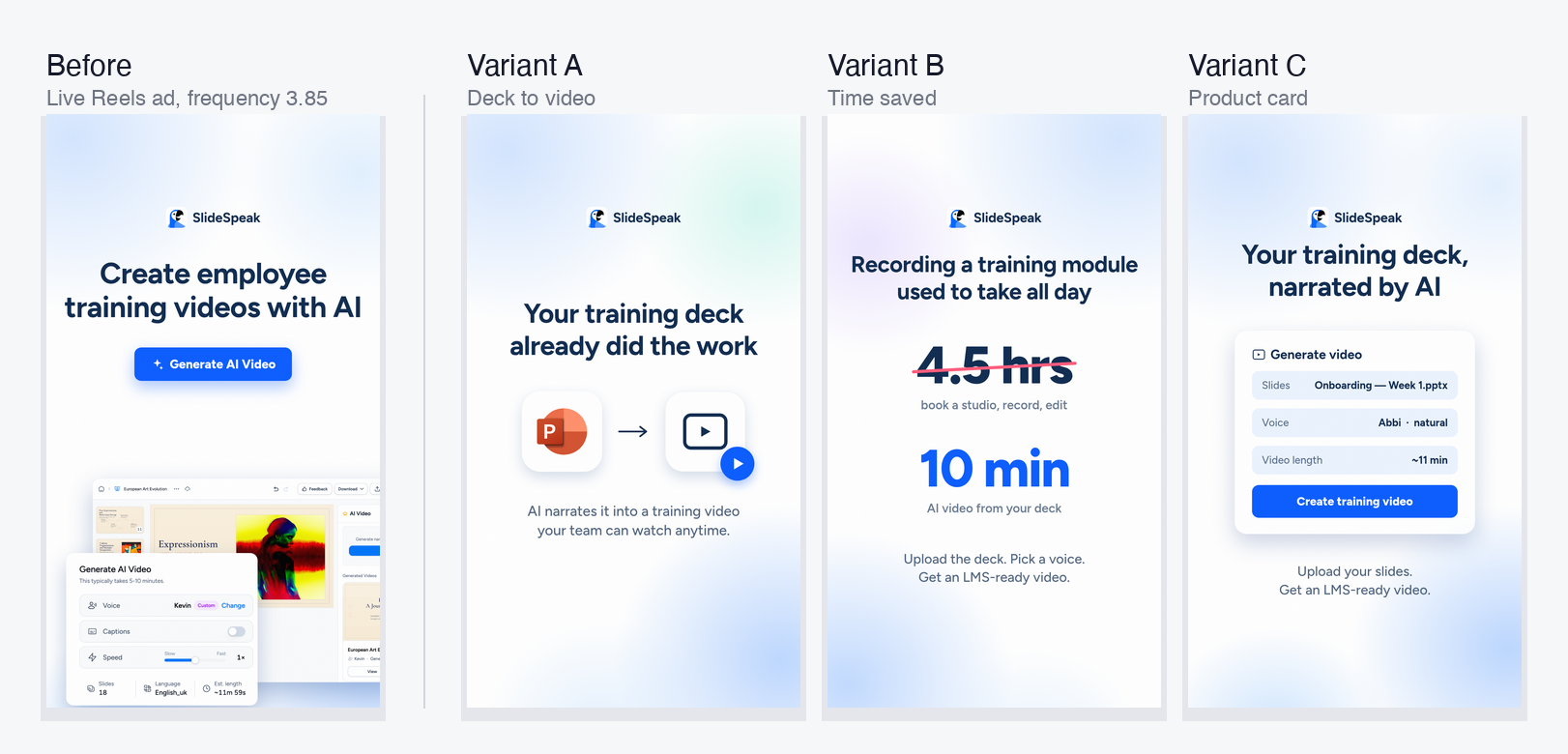
The feed ad still converts but frequency is past 3 and CTR is stuck near 1.2%. Refresh it with two new square variants on the same “your slides already did the work” angle. Separately, the vertical ad is under-delivered and Instagram Reels is the cheapest placement in the campaign at $0.85 per click. Build three new vertical variants for the Reels ad set and give it room to spend.
Step 4: Design the variants on Doop
The agent duplicates the winning frame, applies a change from its brief, and screenshots the result. Then it reviews the image against a checklist: text fits, contrast passes, the logo sits clear of the Reels caption bar and profile chip. If something is off, it edits and checks again. Only then does it export the PNG.
This self-review loop is the difference between a demo and something usable. Vertical ads are the usual failure: a headline that lands behind the caption bar, or a logo hidden under the profile chip. The checklist catches both before a human sees them.
Step 5: Stage, do not launch
Finally, the agent uploads each PNG as a creative and creates a paused ad in the target ad set. It also pauses fatigued ads, but only if the ad set keeps at least two active ads. Then it posts a summary to the canvas: what it paused, what it staged, and why.
A human opens Ads Manager, reviews the paused ads, and switches on the ones they like. That approval takes ten minutes instead of a full morning.
Step 6: Put it on a schedule
Everything above runs from one prompt. What turns it into automation is running that prompt every Monday without anyone typing it. There are two ways to do that with Claude Code, and the choice depends on where your credentials should live.
Option A: a Claude Code routine in the cloud. Routines are scheduled cloud sessions. Each run starts a fresh sandbox with a checkout of a repo you name, so the agent has zero memory of last week and reads everything from the repo and the canvas. You create one from the terminal with /schedule, or at claude.ai/code/routines. The pieces you need:
- A small repo with the instruction file, the classification rules and a
run.mdprompt. - The Meta CLI installed in the routine’s environment, plus
ACCESS_TOKENandAD_ACCOUNT_IDset as environment secrets there, never in the repo. - The Doop connector attached to the routine, so the agent can read and write frames on the canvas.
- A cron expression in UTC. Monday at 08:00 Pacific is
0 15 * * 1. The minimum interval is one hour, which is far more often than an ad account needs.
The prompt is the whole job description. Ours is short because the instruction file and the rules carry the detail:
Run the weekly Meta ads loop on Doop canvas ID: XXXXXXXXXX.
1. Pull last 7 days and the 7 before for every active ad with the Meta CLI.
2. Classify each ad with rules.md and write the table as a note on the canvas.
3. For each winner, write a brief on the canvas, then design up to 3 variants
   as new frames next to it, matching the existing frames' style. Export each
   frame with the Doop export tool, which returns a PNG URL.
4. Pass each PNG to the Meta CLI as a creative and create a PAUSED ad in the
   winner's ad set. Pause fatigued ads only if the ad set keeps 2 active ads.
5. Post a summary note: what you paused, what you staged, and why.
Never change budgets or bids.
The rules file the prompt refers to is plain text too. This is the whole of ours:
# rules.md — how to classify an ad (7-day window vs the 7 days before)

Ignore: spend < $100 or impressions < 1000 in the window.
Winner:   cost per purchase in the top third of active ads,
          frequency < 3, CTR flat or up vs previous week.
Fatigued: spend above campaign median AND
          (CTR down > 20% vs previous week OR frequency > 3).
Everything else: hold, no action.

Limits: max 5 new creatives per run. Never touch budgets or bids.
New ads are always created PAUSED.
Option B: local cron with headless Claude Code. If you would rather keep the token on a machine you control, run Claude Code in print mode from cron. The allowlist from the setup post means it will not stop for permission prompts:
# crontab -e
0 8 * * 1 cd ~/meta-ads-agent && claude -p "$(cat run.md)" >> runs.log 2>&1
Codex works the same way with codex exec in place of claude -p. The trade-off is that a laptop that is asleep on Monday morning skips the run, which is why we moved to the cloud routine.
Either way, the agent’s output is not a chat message nobody reads. It is a set of notes and frames on the canvas and a set of paused ads in Ads Manager, and both are waiting when you open your laptop.
Guardrails worth adding
Automation without limits is a fast way to burn budget. If you automate Meta ads, you need hard limits. These are the ones we settled on:
- Never change budgets. The agent creates and pauses ads. It does not touch daily budgets or bids.
- Cap creatives per run. Five new creatives per week is enough to test. More than that dilutes spend and slows learning.
- Require a minimum sample. No ad gets classified with fewer than 1,000 impressions.
- Keep a human on launch. Every new ad starts paused. This is the one step we refuse to automate.
- Log every decision on the canvas. The brief and the classification table live next to the frames, so anyone can audit a run a month later.
What this changes for a marketing team
The weekly loop still happens. However, the team now spends its time on the two parts that matter: setting the rules and approving the creative. The agent handles the data pull, the classification, the first draft of every variant and the upload before anyone logs in.
For SlideSpeak, this is the difference between launching two creatives in three weeks, which is what happened by hand, and staging new variants every Monday. For an agency running twenty accounts, the same loop runs twenty times on Monday morning, and every brief and every frame is on a canvas the client can open.
Try it yourself
- Install the Meta CLI and run
meta auth statusto confirm your token and ad account. - Create a Doop canvas and move your existing ad designs onto it so they share one stylesheet.
- Write your classification rules in a text file. Start strict.
- Give Claude Code the loop above as an instruction file and put it on a weekly routine, as in step 6.
- Review the paused ads every Monday and loosen the rules as you learn.
If you want to see how agents design on a canvas in more detail, read how AI agents use Doop.